Shakudo
Use Case
Integrate Supply Chain Data Across SharePoint, OneDrive, and Power BI
SEE IN ACTION







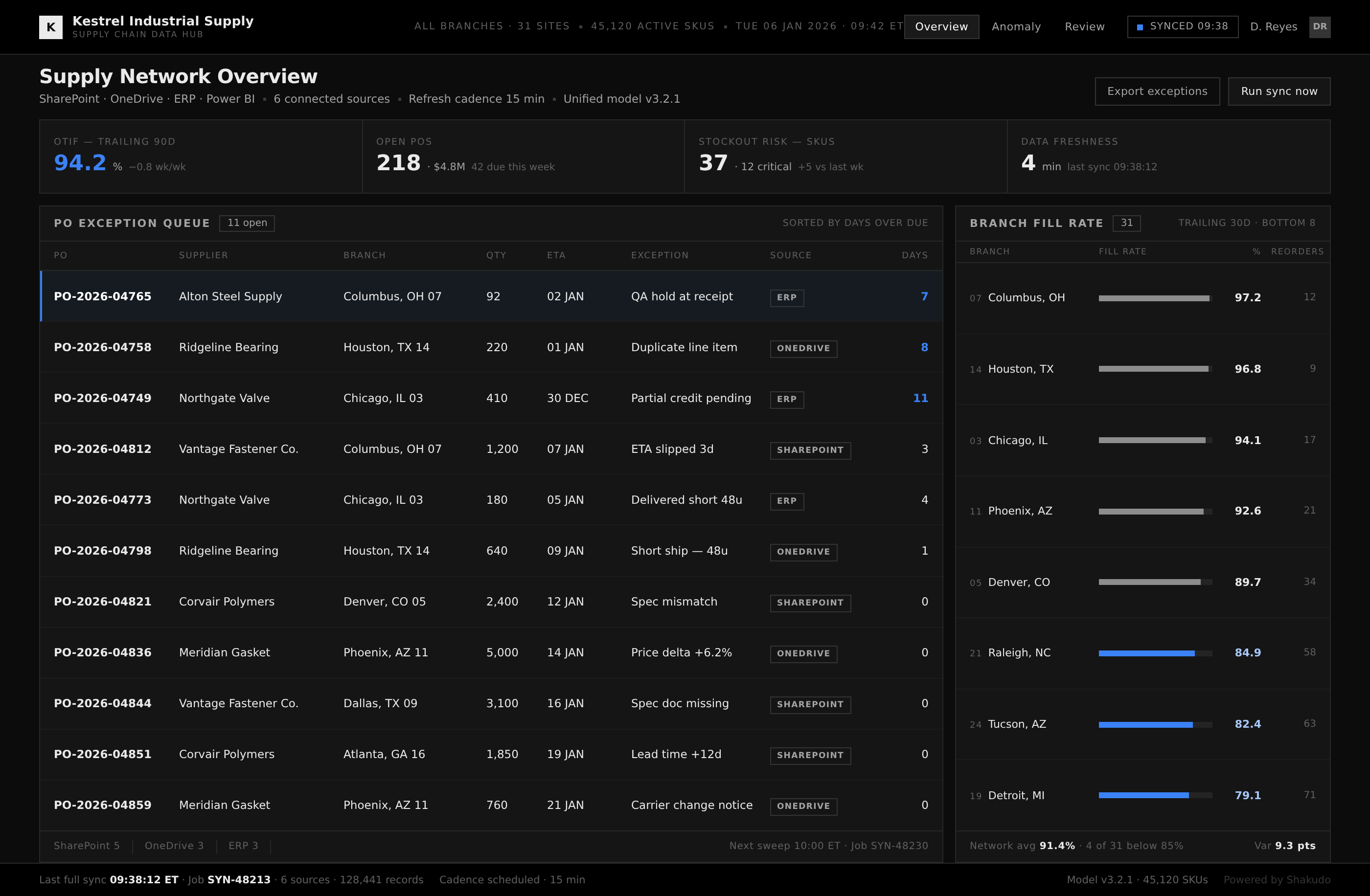
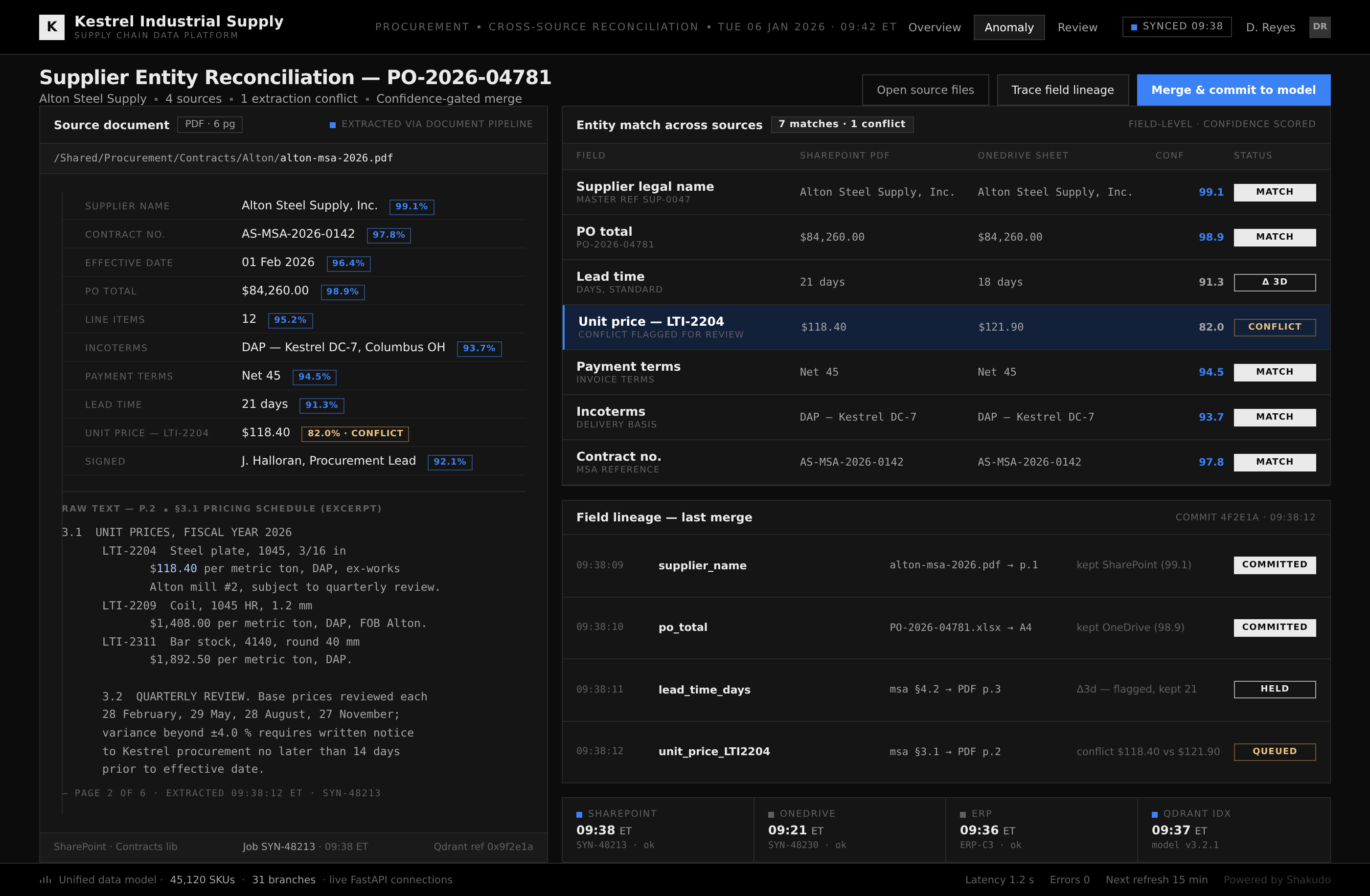
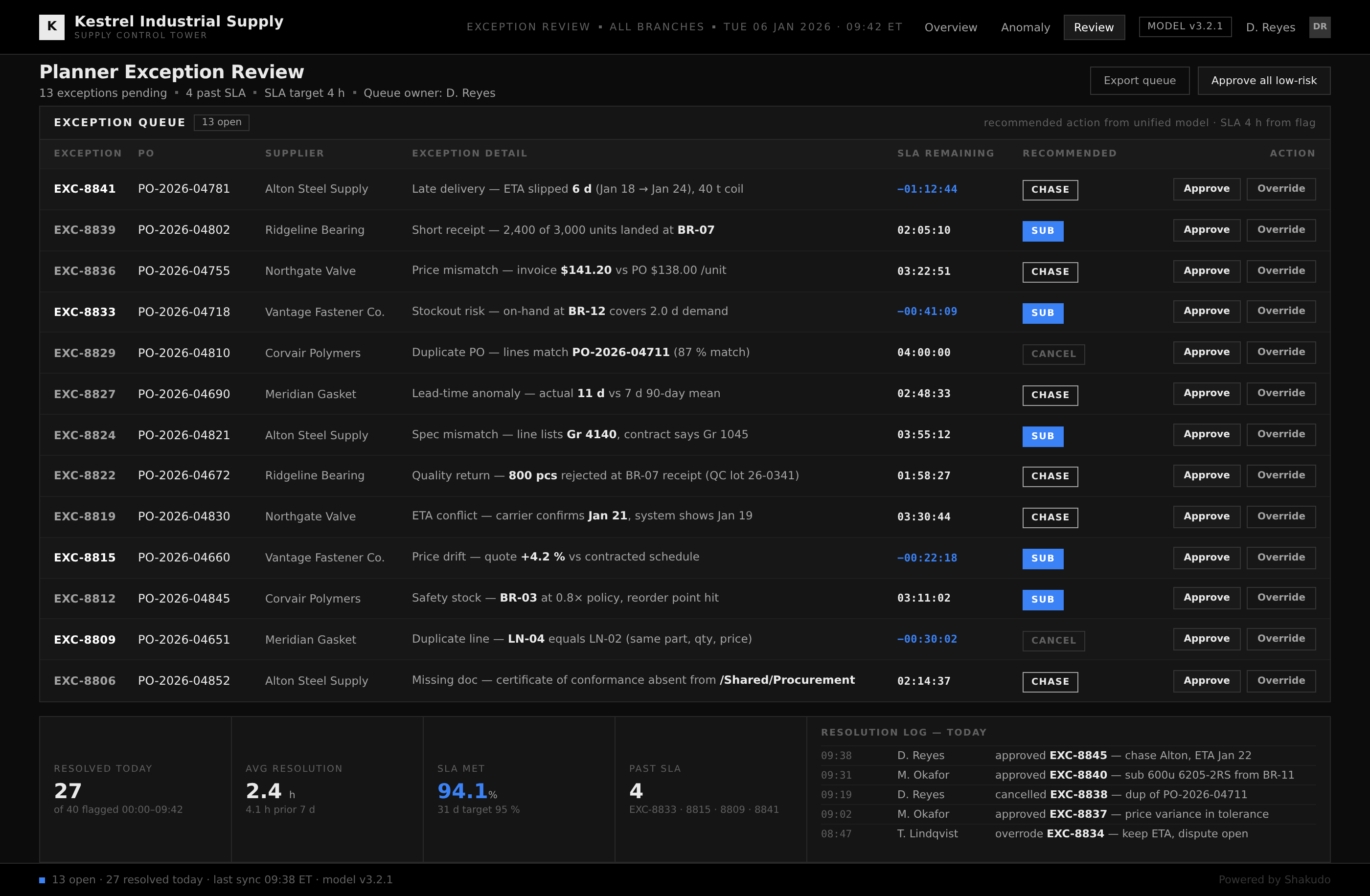
Three screens from a live planning cycle: the network overview, the entity reconciliation, and the exception review.
1–2 / 3
An automotive manufacturer operating 12 facilities manages 50,000 or more SKUs while tracking shipments, inventory, and equipment health across multiple ERP systems with no unified view. Supplier contracts sit in SharePoint libraries, production schedules live in OneDrive folders, and executives expect dashboards in Power BI. When that data stays in separate silos, plant managers cannot see inventory levels at other facilities, and the result is excess stock at some plants and stockouts at others.
Supply chain data fragments naturally as organizations grow. Each plant adopts its own tools, each department standardizes on different file formats, and procurement, logistics, and production teams maintain separate copies of the same supplier information. SharePoint document libraries hold contracts and specifications. OneDrive folders accumulate ad hoc spreadsheets. Power BI dashboards pull from a subset of these sources, often with manually refreshed connections that break when files move or rename.
The cost is measurable. A manufacturer with 12 plants and 50,000 SKUs can lose millions annually to unplanned downtime when equipment failure data sits in a system no one monitors in real time. Excess inventory ties up working capital because managers order conservatively when they cannot trust the numbers from other facilities. Sourcing teams spend days reconciling supplier lists stored across multiple drives, and by the time a report reaches leadership, the data is already days old.
Shakudo builds an integration layer that connects SharePoint document libraries, OneDrive file storage, and Power BI workspaces into a single automated pipeline. Automated workflows pull supplier contracts, inventory spreadsheets, and production logs from their source locations on a schedule, normalize the data into a shared schema, and push it into a unified data model. Power BI dashboards then render against that model with live connections rather than manual exports.
The pipeline handles file format differences automatically: a supplier specification stored as a PDF in SharePoint, a production log in an Excel file on OneDrive, and a shipment record in a database all feed the same reporting layer. Document processing extracts structured data from contracts and PDFs, and scheduled refreshes keep dashboards current on a cadence the team controls. The result is real-time visibility across every facility, with the integration running inside the existing Microsoft 365 and Power BI environment.
The deployment is incremental: connect SharePoint first, add OneDrive sources next, then layer Power BI dashboards on top, with each phase delivering value on its own. An automotive parts manufacturer connected 200 machines across 12 plants on this pattern and reduced unplanned downtime by 65 percent while cutting supply chain costs by 25 percent.
The integration fits manufacturing organizations that run multiple facilities and track inventory, shipments, and supplier performance across SharePoint, OneDrive, and Power BI. It suits plant managers and operations teams that need cross-facility visibility, sourcing teams that reconcile supplier lists by hand, and leadership that wants consistent metrics from every plant without waiting on manually assembled reports.
Automated workflows authenticate to SharePoint document libraries and OneDrive folders through standard APIs, extract data on a schedule, and push it into a shared data model that Power BI dashboards query with live connections. No manual exports or file transfers are required. The pipeline handles different file formats and refreshes dashboards automatically on a cadence you define.
Yes. Document processing extracts structured data from PDF contracts, supplier specifications, and Excel spreadsheets stored across SharePoint and OneDrive. The pipeline normalizes extracted data into a consistent schema so that dashboards combine information from mixed file types without manual formatting or data entry. Confidence scoring flags low-confidence extractions for human review.
Deployment follows an incremental path. Connecting SharePoint document libraries and OneDrive sources can take weeks when built on an existing AI platform. Adding Power BI dashboards and automated report distribution follows in subsequent phases, with each connected data source delivering value independently as the system expands across facilities.
The integration layer connects to existing ERP systems, logistics platforms, and supplier portals through standard APIs alongside SharePoint and OneDrive. It adapts to your current tool stack rather than requiring a replacement. Existing dashboards and reports continue to work while the unified data model adds new cross-facility visibility on top of existing infrastructure.
When the goal is one live view across every facility, a conversation with Shakudo is the fastest way to see it on your own data. The pipeline deploys inside the Microsoft 365 environment you already run, and a first connected source is live within days. Book a demo to watch it unify SharePoint, OneDrive, and Power BI.
Manufacturers unify supply chain data scattered across SharePoint, OneDrive, and Power BI into a single automated reporting pipeline. The system connects document libraries, spreadsheet data, and dashboard outputs so teams see live inventory levels, shipment status, and supplier performance in one place. Manual report assembly drops to minutes while data accuracy improves across every facility.










"What drew me in is simple. When developers ship production-ready code this quickly, how can I have environments spun up fast enough? Shakudo is how we close that gap."



"Shakudo does not just provide the platform. It is a real partnership. They are always there to help and execute our vision faster and the right way. It is like a co-team working together to achieve our goals."